
Zapier automation ideas for freelancers are becoming essential in 2026 as more professionals seek ways to save time, reduce manual work, and scale their freelance businesses efficiently. I have seen freelancing change a lot in the USA and UK. Now it’s 2026. Being successful is not just about having skills. It’s also about having systems working fast and using automation.
Reports from 2025 to 2026 say that freelancers who use automation tools like Zapier can save 10 to 20 hours every week. This can mean $500 to $2,000, or £400 to £1,600, every month.
This guide will share 50 Zapier automation ideas. Each one is designed to help freelancers save time, get clients, and grow their business efficiently with Zapier.
What are Zapier automation ideas?
Zapier automation ideas are like recipes that help you connect apps, such as Gmail, Stripe, Notion, and Google Sheets, to make your work easier. You can use Zapier to automate tasks that you do over and over again as a freelancer. These tasks include:
- Capturing leads
- Getting new clients set up
- Sending out proposals
- Managing invoices
Zapier automation ideas for freelancers help automate repetitive tasks and save time.
If you want to learn about a complete system, you can read: AI Workflow Automation for Freelancers: The Best Ultimate Guide to Work Faster in 2026
50 Zapier Automation Ideas (Step-by-Step)
Zapier automation ideas for freelancers help automate repetitive tasks and save time. Many professionals use Zapier automation ideas for freelancers to streamline their workflow.
Lead Generation and Client Acquisition
Capture leads from multiple platforms
It is very important for any business. To start with, you can capture leads from platforms like Facebook Ads, LinkedIn, or even from your website forms. You can automatically collect these leads from Facebook Ads, LinkedIn, or website forms and import them into Google Sheets or a CRM.
Send instant personalized email responses
Then you can send personalized email responses to these leads. For example, you can trigger a Gmail response when a lead submits a form. This will really improve your response time to these leads.
Save LinkedIn leads to Notion or Airtable
You can also save these LinkedIn leads to Notion or Airtable. This will automatically create a searchable lead database for you.
Get alerts for high-value leads
If you want to get alerts for high-value leads, you can send Slack or Telegram notifications when a lead budget exceeds $1,000 (£800).
Add leads to email marketing tools
You can also add these leads to email marketing tools like Mailchimp or ConvertKit for nurturing.
Client Onboarding Automation
Send onboarding forms automatically
The best Zapier automation ideas for freelancers include client onboarding and email automation. You can send onboarding forms automatically. For instance, you can trigger a Typeform or Google Form after a client signs up with you.
Create client folders in Google Drive
Then you can create client folders in Google Drive. You can auto-generate organized folders with client names.
Send contracts automatically
You can also send contracts automatically using DocuSign integration for instant agreement sharing.
Add clients to project management tools
After that, you can automatically add clients to project management tools like Trello or ClickUp.
Send welcome email sequences
Finally, you can send email sequences to deliver onboarding instructions and expectations instantly.
Explore more about Client Onboarding Automation for Freelancers: 7 Powerful Steps
Project Management Automation
Convert emails into tasks
You can convert emails into tasks. For example, you can automatically turn Gmail messages into Trello or ClickUp tasks.
Update project status automatically
Then you can automatically update the project status. You can mark progress when tasks are completed.
Send deadline reminders
You can also send deadline reminders to notify yourself or clients before deadlines.
Sync tasks with Google Calendar
After that, you can sync tasks with Google Calendar to ensure all deadlines are visible.
Generate daily task summaries
Finally, you can generate task summaries to receive automated reports of ongoing work.
These Zapier automation ideas will really help you with Lead Generation and Client Acquisition, Client Onboarding Automation, and Project Management Automation. Use these Zapier automation ideas to streamline your workflow and save time.
Proposal & Sales Automation
Send proposals instantly after inquiry
You can send proposals away after someone asks about your product. This happens when someone fills out a form on your website, and you send them a proposal immediately.
Track proposal opens
It is an idea to track when people open your proposals. You can use a tool called PandaDoc to see if people are actually looking at the proposals you send them.
Send follow-ups automatically
If you do not hear back from someone, you can automatically send them a follow-up message. This usually happens a day or two after you send the proposal, like two or three days.
Store proposals in CRM
You should keep all your proposals organized in one place, such as a customer relationship management (CRM) system. This helps you keep track of all the deals you are working on.
Tag hot prospects automatically
You can also use automation to identify people who’re very interested in your product. This is done by looking at how they behave on your website and then tagging them as prospects.
To get results, you can use AI Proposal Writing Tools: Best Tools to Win USA & UK Clients in 2026
Finance and Payment Automation
Generate invoices automatically
When you make a sale, you can automatically generate an invoice. This is done by connecting your payment system, like Stripe or PayPal, to your accounting software, such as QuickBooks or Xero.
Send payment confirmation emails
After someone pays you, you can send them a confirmation email to thank them. This happens automatically, so you do not have to do it yourself.
Track revenue in Google Sheets
You can track how much money you are making in real-time using Google Sheets. This helps you see how your business is doing at any given time.
Send late payment reminders
If someone does not pay you on time, you can automatically send them a reminder. This helps you get paid faster.
Log expenses automatically
You can also automatically track your expenses. This is done by logging the costs of running your business from email alerts.
Content & Social Media Automation
When you write a blog post, you can share it on social media automatically. This means your post will be published on platforms like LinkedIn, Twitter, and Facebook without you having to do it yourself.
You can take your blog posts. Turn them into newsletters. This helps you reach people who prefer to get updates by email.
If you see an idea for content on social media platforms like Reddit or Twitter, you can save it in a tool called Notion. This helps you keep track of all your ideas in one place.
Monitor brand mentions
You can monitor what people are saying about your brand online. If someone mentions your brand, you can get an alert sent to you through a tool called Slack, which uses Google Alerts to track mentions.
Auto-publish WordPress posts
You can also publish your WordPress posts automatically. This streamlines the process of getting your content out to people.
Email & Communication Automation
Auto-label incoming emails
When you receive an email, you can have it automatically labeled. This means emails are categorized into groups like leads, clients, and invoices so you can find them easily.
Save email attachments automatically
If someone sends you an email with an attachment, you can save the attachment automatically in Google Drive. This helps you keep all your files organized.
Set auto-replies during off-hours
If you are not available to respond to emails while away, you can set up an auto-reply message. This is especially useful if you work with people in time zones such as those in the US and the UK.
Summarize emails using AI tools
You can use tools that summarize emails for you. This saves you time because you do not have to read through all your emails to understand their contents.
Convert emails into CRM entries
Finally, you can take emails. Turn them into entries in your CRM. This ensures you don’t miss any leads and can follow up with people who’re interested in your product.
Time Tracking & Productivity
Track time using Toggl automatically
I use Toggl to track my time. It logs my work hours into Google Sheets.
Generate weekly productivity reports
I get productivity reports that show me how I am doing. These reports give me a summary of my performance.
Track billable hours per client
Time Tracking and Productivity help me track the hours I bill to each client. It makes it easy to keep track of client billing.
Sync meetings with Notion
I sync my meetings in Notion to keep my schedule organized.
Set focus reminders (Pomodoro)
I set reminders to help me stay focused. This is like the Pomodoro technique, where I work for a set period and then take a break.
AI-Powered Automation (2026 Trend)
In 2026, people who use automation and AI can get up to 45 percent of their work done.
Generate content drafts using AI
I can use AI to help me write drafts. This means I do not have to spend much time writing blogs or copy.
Summarize Zoom meetings automatically
When I have a Zoom meeting, AI can summarize what we talked about. It makes a list of what we discussed.
Generate AI-powered proposals
AI can even help me make proposals for clients. This saves me a lot of time when I am trying to get clients.
Auto-reply to emails intelligently
When someone emails me, AI can respond. This means I can get back to people faster.
Qualify leads using AI scoring
AI helps me figure out which clients are the most valuable. This way, I can focus on the clients who are most valuable to me.
Want to go deeper? Explore the AI Tools for Freelancers: Best Powerful Tools to Boost Productivity in 2026
to upgrade your entire workflow. Or learn practical setups in 10 AI Automation Workflows Every Freelancer Should Use and start implementing today.
Advanced Freelance Automation Systems
Build a complete sales pipeline
I can make a system for selling things. It starts with a lead, then I put them in my CRM, then I send them a proposal, then I send them an invoice. Finally, they pay me.
Create multi-step automation workflows
I can create a workflow that handles many tasks automatically. I can chain lots of Zaps together.
Automate client lifecycle management
I can automate the process of working with a client. From the time we meet to the end, it is all automatic.
Trigger upsell offers automatically
When the time is right, my system can offer the client a chance to buy more from me. This helps me make money from each client.
Build a fully automated freelance business
I can even make my whole business automatic. This means I do not have to do work to keep it running.
Ready to turn these ideas into a complete system? Explore How to Build an AI Automation System for Your Freelance Business.
ROI Comparison: Manual vs Automated Work
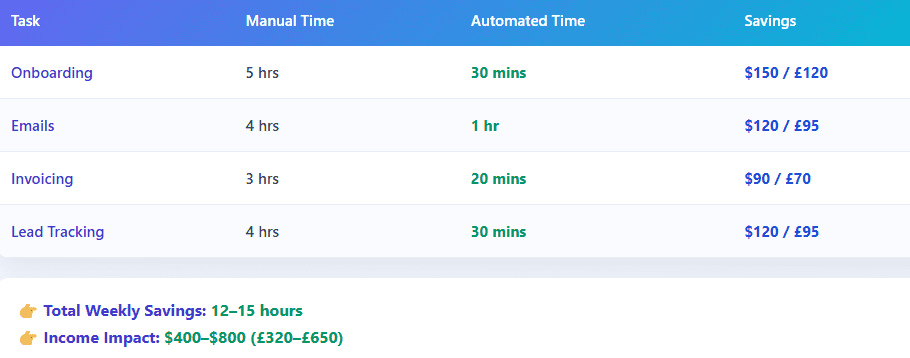
These Zapier automation ideas for freelancers can improve efficiency and reduce manual work.
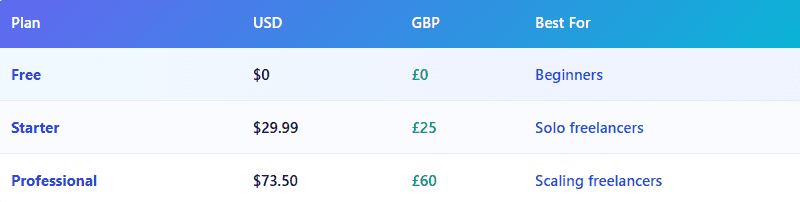
Zapier Pricing
Pros And Cons
Pros
- You do not need to do any coding
- Zapier has integrations with other tools
- Zapier saves you time instantly
- Zapier is scalable
Cons
- Zapier is expensive when you use it a lot
- Zapier has limited flexibility compared to custom tools
Not sure which automation tool fits your needs? Explore Zapier vs n8n: Which Automation Tool Is Better for Freelancers?
Final Thoughts
For freelancers, Zapier is essential because it helps their businesses grow.
Start with things:
- Lead capture
- Onboarding
- Invoicing
Then you can fully automate your entire freelance system with Zapier.
FAQ
-
What are the best Zapier automations for freelancers?
Lead capture, onboarding, email automation, and invoicing.
-
Is Zapier worth it in 2026?
Yes, it can increase income by $500–$2,000/month.
-
Can Zapier replace a virtual assistant?
Partially—it handles repetitive tasks but not strategy.
-
How many workflows should I start with?
Start with 2–3 high-impact automations.
-
Is Zapier better than n8n?
Zapier is easier; n8n is more flexible.