
Client onboarding automation for freelancers is becoming essential in 2026. Instead of manually handling every new client, freelancers can use automation tools to streamline onboarding, save time, and improve client experience. Freelancers nowadays work in a fast-paced, competitive online world. Clients want to hear from freelancers quickly, they want things to be easy to understand, and they want everything to go smoothly from the very start.
When freelancers have to do everything for each client. Like sending emails, contracts, invoices, questionnaires, and project briefs. It gets really time-consuming. That is where automating the client onboarding process for freelancers can be a help.
Some 2025 reports said that freelancers who use automation for tasks can save around 8 to 12 hours per week. In 2026, some market research showed that freelancers who use automation tools can respond to clients up to 60% faster. Instead of wasting time on boring tasks, freelancers can focus on what matters: completing projects and building relationships with clients.
This guide will show freelancers in the US and UK how to automate their client onboarding process, one step at a time, using automation tools and artificial intelligence.
Why Client Onboarding Automation Matters for Freelancers
Freelancers often waste time. Miss out on opportunities because getting started with new clients takes too long.
Manual processes for getting clients up to speed create a lot of issues:
- Slow responses from clients
- Leads get lost because it takes a long time to communicate
- Much paperwork for freelancers
- Clients have experiences
Using automation fixes these problems by setting up step-by-step workflows that start automatically when a new client signs up.
The benefits are:
- Faster start for clients
- Clients get an experience
- Less paperwork for freelancers
- More clients say yes
- Everything is organized and documented properly
For freelancers who work with clients in the US and UK, automation helps meet the standards expected in these countries.
What Client Onboarding Automation Looks Like
Onboarding can be a lot easier with automated systems. They do tasks for us that we used to do by hand.
Instead of sending emails and documents ourselves, the automated onboarding system handles it. It can handle things like:
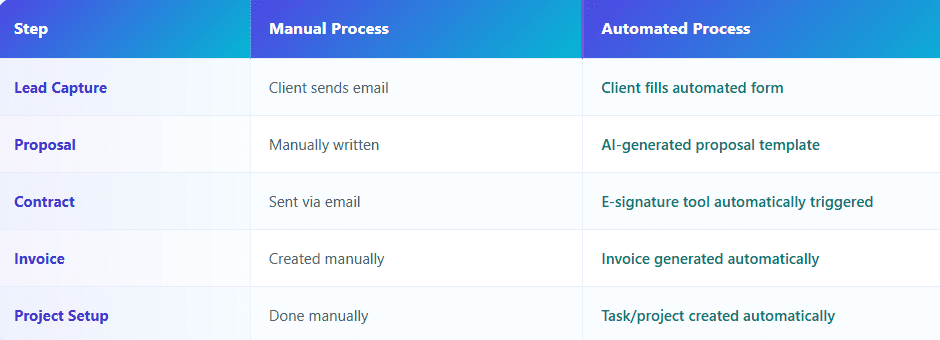
An onboarding workflow can get a new client started in under 10 minutes. This is because automated onboarding replaces all the work we used to do. Automated onboarding makes the process faster and easier for everyone involved.
Step-by-Step: How Freelancers Can Automate Client Onboarding
Step 1: Create a Client Intake Form
The first step is to get the client’s information.
Instead of using email conversations, use a client intake form to collect data.
Here are some used tools:
- Typeform
- Tally
- Google Forms
- Notion Forms
The key information to collect includes:
- Client name
- Company name
- Budget range
- Project scope
- Timeline
- Preferred communication channel
This data helps start automation workflows.
Step 2: Automate Lead Capture and CRM Entry
When the form is submitted, automation tools can store client data.
For example, when a client submits a form, an automation workflow can send the data to a CRM system.
Freelancers often store client data in:
- Airtable
- Notion
- HubSpot CRM
- Google Sheets
This way, every client inquiry is automatically logged and organized. Automation platforms like Zapier and n8n make this process easy.
If you are not sure which automation platform to choose, read our comparison of Zapier vs n8n to see which automation tool is better for freelancers and solopreneurs.
Step 3: Automatically Send a Welcome Email
The next step is to create an email automation. When a new lead submits the intake form, the system can automatically send the following:
- An introduction email
- Project overview confirmation
- Next steps
- A booking link for a consultation
Some example tools include:
- Gmail automation
- MailerLite
- ConvertKit
- ActiveCampaign
This ensures that clients receive communication, which is a major factor in building trust.
Step 4: Automatically Send the Proposal
Freelancers often spend hours writing proposals. Instead, AI tools can automatically generate custom proposals.
Here’s an example workflow:
Client form submitted → AI generates proposal → proposal sent automatically.
Some popular tools include:
- Better Proposals
- PandaDoc
- Proposify
- AI proposal generators
The typical proposal pricing ranges freelancers charge are the following:
- US Freelance Projects: $500 – $5,000
- UK Freelance Projects: £400 – £4,000
Freelancers who want to speed up the proposal creation process can consider AI proposal-writing tools. These tools can help freelancers win clients in the United States who are willing to pay a lot of money, and also help them get more clients.
Step 5: Automate Contract Signing
After the proposal is accepted, the system should automatically send a contract.
The best tools for this are:
- DocuSign
- HelloSign
- PandaDoc
- Bonsai
The automation workflow is:
Proposal accepted → contract sent → signed contract stored automatically.
This removes delays. Protects freelancers legally.
Step 6: Automatically Generate the Invoice
Once the contract is signed, invoicing can also be automated.
Freelancers typically integrate payment tools such as the following:
- Stripe
- PayPal
- Wise
- Square
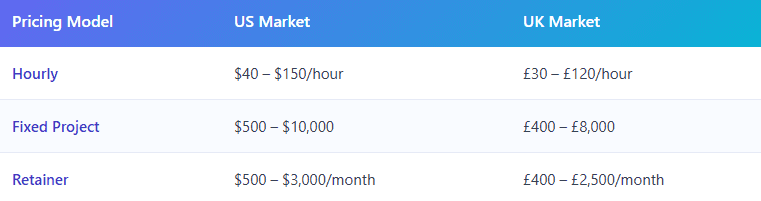
Automation ensures invoices are generated after contract signing.
Step 7: Automatically Create a Project Workspace
After payment confirmation, the project workspace should be created automatically.
Some tools used by freelancers are:
- Notion
- ClickUp
- Trello
- Asana
The automation workflow example is:
Payment confirmed → project created → client invited to workspace.
This creates a structured and professional project kickoff.
Recommended Automation Tools for Freelancers
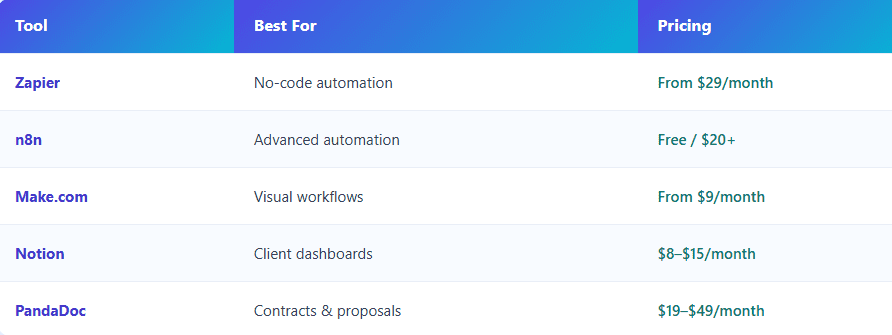
Many freelancers are now adopting client onboarding automation to scale their businesses and handle more clients efficiently. With client onboarding automation for freelancers, you can automate emails, forms, payments, and follow-ups without manual work.
If you are trying to build a freelance workflow that works well, you should check out our guide on the Best AI Tools for Freelancers.
Example Client Onboarding Automation Workflow
An automated freelance onboarding system usually works like this:
- Client fills out an intake form
- The system automatically saves the client’s data
- A welcome email is sent to the client
- The system. Delivers an AI proposal
- A contract is sent to the client for signature
- An invoice is generated for the client
- Payment confirmation starts the project setup process
This entire system can run on its own without needing help. Freelancers who set up these workflows are basically building an automated business around themselves.
Pros and Cons of Automating Client Onboarding
Pros
- It saves 8–10 hours every week
- Clients get responses
- The onboarding experience feels more professional
- There are mistakes with administrative tasks
- It’s easier for freelancers to handle more clients
Cons
- Setting it up takes some time at first
- Learning the automation tools can take some effort
- Some tools cost money every month
- The benefits of automation usually outweigh the costs after just a few client projects.
Final Thoughts
Client onboarding automation helps businesses streamline the entire onboarding process by automatically collecting client information, sending welcome emails, assigning tasks, and organizing communication in one workflow. Freelancing is not about being skilled in 2026; it’s also about having good systems and being efficient.
Freelancers who automate their onboarding processes get benefits:
- They convert clients faster
- They look more professional
- They have time to do work that makes money
Instead of working alone, freelancers can use automation to operate like a small digital business.
By setting up an onboarding automation workflow, freelancers can greatly improve their productivity and the way clients feel. For freelancers who work with clients in the US and UK, professional automation workflows are becoming a must-have, not a nice-to-have.
FAQ
-
How do freelancers automate client onboarding?
Freelancers automate onboarding using tools like Zapier, n8n, and CRM systems to automatically send proposals, contracts, and invoices, and handle project setup tasks after a client inquiry.
-
What tools are best for automating freelance onboarding?
Popular tools for payment automation include Zapier, n8n, PandaDoc, Notion, Airtable, and Stripe.
-
How long does it take to set up onboarding automation?
Basic onboarding automation can be set up in 2–4 hours, while advanced AI automation systems may take 1–2 days.
-
Is automation expensive for freelancers?
Not necessarily. Many freelancers start with tools costing $10–$30 per month (£8–£25), which quickly pay for themselves through saved time.
-
Can automation help freelancers get more clients?
Yes. Faster response times and professional workflows improve client trust and conversion rates, helping freelancers win more projects.