AI strategies are helping remote workers manage workload, improve focus, and stay productive without burnout. Remote work is great because it gives us flexibility. It also brings many problems. We get many notifications; it is hard to separate work and personal life, and our brains get overwhelmed. For people who work from home in the US and UK, like freelancers and solo business owners, this can lead to burnout, and we do not get as much work done as we should. The answer is not to work longer hours but to work smarter with the help of artificial intelligence.
In 2025, reports indicated that more than 68% of remote workers in the US and the UK use artificial intelligence tools daily to manage their work and stay focused. In 2026, it was found that people who use artificial intelligence in their daily work are 30-45% more productive and experience less burnout.
Let us see how this works.
Why Remote Workers Are Getting Burned Out in 2026
Working from home is not new. The challenges are changing.
Key burnout triggers:
- Always being available to talk on Slack, email, or WhatsApp
- Switching between different tools
- Not having a regular schedule
- Feeling like we need to be visible online all the time
- Having too many manual tasks like answering emails, scheduling meetings, and writing reports
This leads to us not being able to focus, working more slowly, and getting tired easily.
Many people who work from home also have a time when they are seen, which makes them feel really tired. This is where you should look at How to Use AI to Show Your Value and Stay Visible in a Remote Job.
How AI Solves Workload and Burnout Problems
Artificial intelligence does not just do tasks for us; it also reduces the effort we need to put into decision-making and thinking.
Core benefits of AI for remote workers:
- It does tasks that we do over and over, like answering emails, scheduling meetings, and writing reports
- It helps us decide what work is most important
- It reduces the need to switch between many tools
- It creates a schedule for our work
- It lets us work on our own without needing to talk to others all the time
AI for Workload Management: Automate What Drains You
Tasks you should automate immediately:
- Sorting and answering emails
- Scheduling meetings
- Deciding what work to do first
- Entering data and writing reports
- Sending reminders and follow-ups
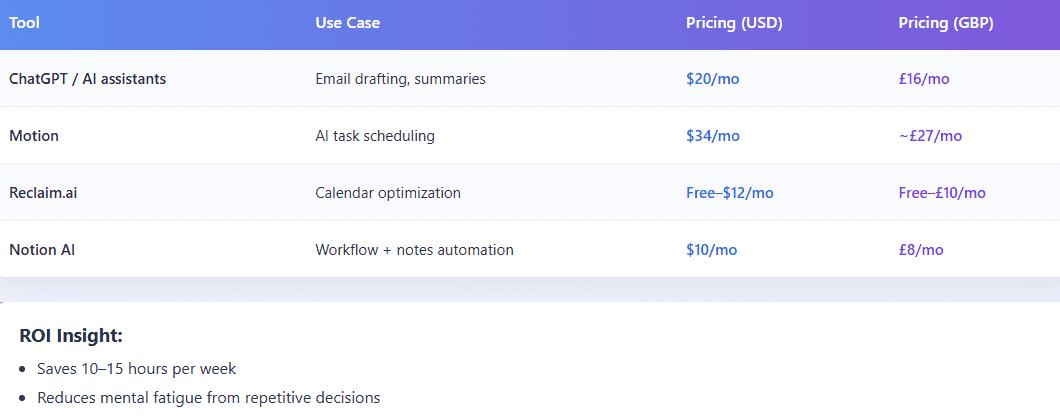
Tools commonly used (US/UK pricing):
AI for Focus: Eliminating Distractions and Deep Work Optimization
The problem:
The problem is that people who work from home waste a lot of time. They lose 2 to 3 hours a day because they get interrupted so often. Some tools use intelligence to help people focus.
Smart Scheduling
- These tools, like Motion, help people work better.
- They block out time for people to do work without any interruptions.
- They also change the schedule of tasks based on how important they are
- They make sure people do not have too many tasks at once.
Context-Aware Task Management
- It figures out which tasks are urgent and which ones are important.
- It ensures that people do the tasks that generate money first.
Distraction Reduction
- Artificial intelligence helps with this by filtering out unimportant notifications.
- It also summarises messages so people do not have to read everything.
If you are getting interrupted all the time by meetings, you should also look at How Remote Professionals Can Use AI to Work Asynchronously Without Meetings.
AI for Digital Burnout Prevention
Artificial intelligence can also help prevent people from getting burnt out.
Burnout is not about working too much. It is also about feeling mentally tired.
How AI reduces burnout:
- It reduces the number of decisions people have to make.
- AI suggests what to do, so people do not have to decide everything.
- It also schedules tasks based on when people have the energy.
- AI ensures people have time to rest and relax, and it does not let them work too much.
AI vs Manual Workflows (Comparison Table)
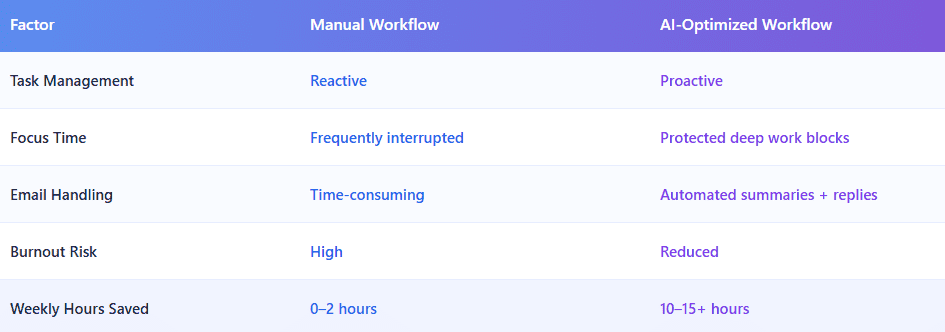
Effective AI strategies can completely change how remote workers handle daily tasks. Not all AI strategies work the same, so testing different approaches is important.
Real-World Use Case (US & UK Freelancers)
Scenario:
A freelance marketer in London and a consultant in New York, managing multiple clients.
Before AI:
These freelancers spent six to eight hours every day doing admin work. They were interrupted all the time by Slack messages and emails. Sometimes they even missed deadlines because they had too much work to handle.
After AI Implementation:
Things got better. The artificial intelligence system schedules tasks automatically. It even helps with drafting emails. It ensures that freelancers have time to focus on their work without interruptions.
Outcome:
The outcome is really good. Freelancers can now bill 30% of hours. They can deliver work to their clients. They feel less stressed out.
Best AI Workflow Stack for Remote Professionals
The stack that we think is the best includes the following tools:
Task & Calendar: Motion or Reclaim
Writing & Communication: ChatGPT
Knowledge management: Notion AI
Automation: n8n or Zapier
Example workflow:
Artificial intelligence captures tasks, from emails to… Then it automatically schedules these tasks. It prioritizes the important work. It sends reminders and updates to the freelancers.
Pros and Cons of Using AI for Work Management
Pros:
- The Artificial Intelligence saves time, and it increases the output
- It reduces the burnout and the stress that people feel
- Artificial Intelligence improves the focus and the deep work that people do
- It enhances the decision-making that people make
Cons:
- There is a learning curve in setting up artificial intelligence.
- People can become overly reliant on artificial intelligence automation.
- There are tool costs for the Artificial Intelligence, which can range from twenty dollars to one hundred dollars, or sixteen pounds to eighty pounds
Strategic Insight: Why AI Is Essential in 2026
The way people work from home is becoming more like artificial intelligence-augmented work. Professionals who do not adopt artificial intelligence:
- They have to work for hours
- They deliver work at a slower pace
- They lose the competitive advantage that they have
- Those who do adopt artificial intelligence:
- They operate like small agencies
- They can scale the output without feeling burned out
- They can increase their income potential
To really get how AI can help you succeed when you work from home, you should read our guide called AI for Remote Professionals: How to Stay Productive, Visible, and Valuable in 2026.
Final Thoughts
These AI strategies help remote workers stay organized and efficient. By using the right AI strategies, you can reduce stress and improve focus. Many professionals rely on AI strategies to manage tasks more effectively. The best AI strategies are those that simplify work without adding complexity.
Artificial intelligence is no longer something that people can choose not to use. It is a performance multiplier that people need to use. In 2026, being successful is not about how many hours people work. It is about how the work is structured.
If people are feeling overwhelmed, distracted, or burnt out, the solution is not to be more disciplined. It is to have systems that are powered by artificial intelligence. People should start small:
- They should automate one task
- They should protect one focus block
- They should reduce one stress point
- Then they should scale the use of artificial intelligence.
FAQ
-
How can AI help remote workers avoid burnout?
AI reduces repetitive tasks, prioritizes work, and protects focus time, lowering mental overload and stress.
-
What are the best AI tools for remote productivity in 2026?
Top tools include ChatGPT, Motion, Notion AI, and Reclaim.ai for task management, automation, and focus optimization.
-
Is AI expensive for freelancers in the US and UK?
Most tools cost between $10–$50/month (£8–£40), making them affordable compared to the time saved.
-
Can AI improve focus while working remotely?
Yes, AI blocks distractions, schedules deep work sessions, and prioritizes high-impact tasks automatically.
-
Do remote workers need technical skills to use AI tools?
No. Most AI tools are user-friendly and require minimal setup, especially for freelancers and solopreneurs.