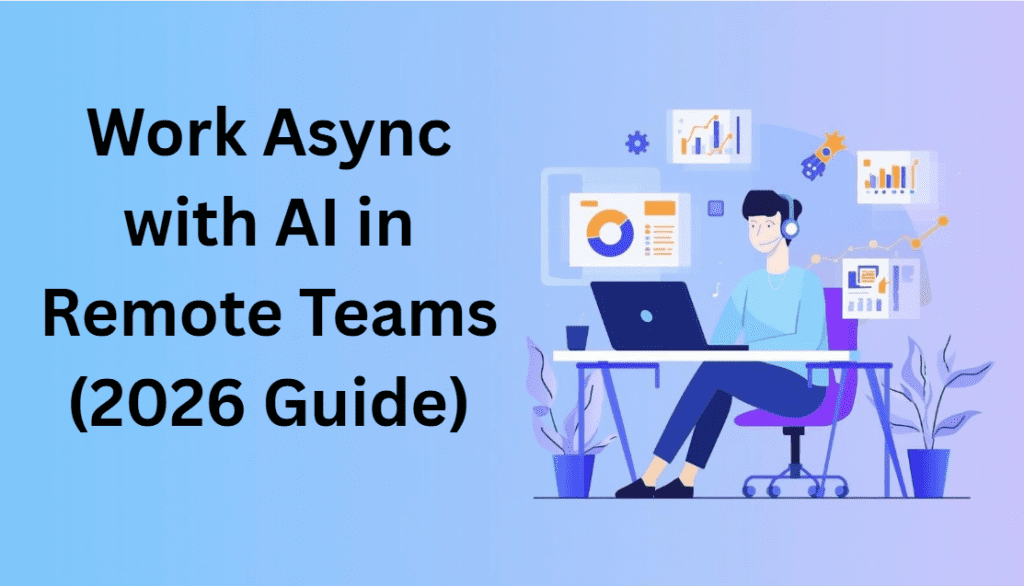
Remote professionals can work asynchronously with AI to stay productive without relying on constant meetings. Remote work in the United States and the United Kingdom is moving towards workflows that do not require everyone to be online simultaneously. According to reports from 2025, professionals now spend up to 60 percent of their workday in meetings. Productivity continues to go down. By 2026, companies using AI-powered systems will be outperforming teams in speed, cost, and quality.
If you are a freelancer, consultant, or remote professional, learning how to use AI for this type of work can directly increase your income. Reduce burnout.
How to Work Asynchronously with AI in Remote Teams
Working asynchronously with AI means completing tasks, sharing updates, and collaborating without needing everyone to be online at the same time. Instead of relying on constant meetings, AI tools help automate communication, organize information, and keep work moving across different time zones. When teams work asynchronously with AI, they can stay productive, reduce interruptions, and focus more on meaningful work rather than real-time coordination.
When you work asynchronously with AI, you can reduce unnecessary meetings and stay focused.
Why Constant Meetings Are a Problem in Remote Work
Meetings seem like a good idea, but they actually cause a lot of problems.
Key Challenges:
- Time zone conflicts: Teams in the US and UK often have time gaps, making it hard to schedule meetings and causing delays.
- Context switching: Jumping between meetings breaks your focus and reduces the quality of your work.
- Unstructured discussions: Many meetings don’t have a plan, wasting a lot of time.
Financial Impact:
- Freelancers charging $50–$150 per hour lose time they could be billing clients.
- Businesses lose productivity across teams.
- Projects slow down because they depend on everyone’s availability.
This is where AI-powered async workflows make a difference.
What Is AI-Powered Async Work?
AI-powered async work means doing tasks, communicating, and collaborating without needing real-time meetings. AI tools help bridge the gap.
In Simple Terms:
Instead of:
- “Let’s jump on a call.”
You shift to:
- “Here’s a structured AI-generated update with everything you need.”
Core Elements:
- AI-generated summaries of verbal updates.
- Smart documentation replaces repeated explanations.
- Automated workflows handle follow-ups and task tracking.
Benefits of Using AI for Work
For Freelancers & Solopreneurs:
- More billable hours: You spend less time on calls and more time on actual work that earns money.
- Faster client communication: AI-generated updates let clients understand progress instantly without scheduling meetings.
- Better scalability: You can handle more clients simultaneously without increasing stress.
For Remote Teams:
- Communication across time zones: Artificial intelligence ensures everyone receives updates, no matter where they are.
- Reduced dependency on availability: Work continues even when team members are offline.
- Improved accountability: Written AI-generated logs create transparency and traceability.
ROI Impact (2026 Trends):
- You can save around ten to fifteen hours per week.
- You can increase productivity by twenty to thirty percent.
- You can reduce costs significantly.
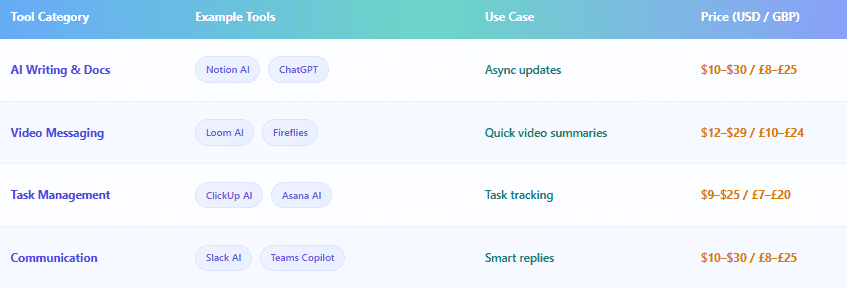
Best AI Tools for Async Work (2025–2026)
Step-by-Step System to Replace Meetings with AI
Replace Daily Meetings with AI Status Updates
Instead of daily meetings, you can create a simple asynchronous update system.
How to do it:
You write updates that include tasks you have completed, blockers, and your next steps.
Then you use artificial intelligence to convert them into a professional summary.
Example Output:
- Completed tasks that are clearly listed
- blockers with context
- Next actions with deadlines
This method saves time and improves clarity compared to live discussions.
Explore more on AI for Remote Professionals: 6 Powerful Ways to Stay Productive, Visible, and Valuable in 2026.
Use video and AI for explanations
Instead of explaining tasks repeatedly in meetings, you can use
Better Approach:
- Record a video around two to five minutes long.
- Then you let artificial intelligence generate a summary, key points, and action steps.
Why it works:
- People can watch the video anytime they want.
- There is no need to schedule a meeting.
- The explanation stays documented.
Build an AI-Powered Documentation System
Documentation is the backbone of work.
Use AI to:
- Convert notes into structured documents.
- Automatically create Standard Operating Procedures (SOPs).
- Maintain a centralized knowledge base.
Result:
- You do not need to repeat instructions.
- There is onboarding for clients or team members.
Automate Task Management with AI
AI can handle much of the project coordination.
AI helps you:
- Break projects into smaller tasks.
- Assign priorities and deadlines.
- Track progress automatically.
Outcome:
- There is less micromanagement.
- There are clarification meetings.
- There is the execution of tasks.
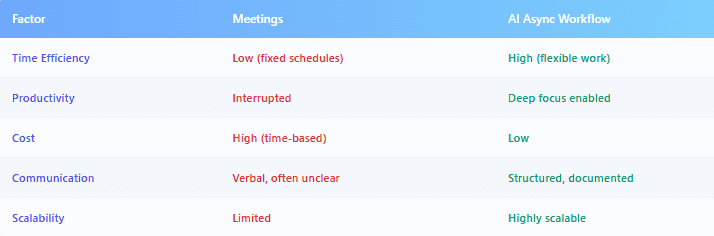
Async Work vs Meetings (Clear Comparison)
Real-World Example (US & UK Workflow)
Scenario:
A freelancer from the UK works with a client based in the US.
Before (Meeting-Based Workflow):
- Weekly Zoom calls
- Lots of Slack messages
- Feedback takes time because of time zones
After (AI Async Workflow):
- Daily updates from AI
- Short Loom videos to explain things
- AI tracks tasks
Results:
Results show that using AI for work can make a big difference:
- We see a reduction in meetings by forty to sixty percent. This is a big deal.
- Faster approvals from clients are also happening.
- People are understanding each other better because of communication clarity.
Advantages and Challenges of AI Async Work
Advantages:
More focus time:
You can work without interruptions.
Better work-life balance:
No night or early-morning meetings.
Scalable workflows:
Systems get bigger as your work does.
Clear documentation:
Everything’s written down and easy to find.
Challenges:
Initial setup required:
Build systems before you see results.
Learning curve:
It takes time to understand AI tools.
Over-automation risk:
Many tools can confuse instead of clarify.
Best Practices for Implementing AI Async Work
Start small:
Start with something like one workflow (e.g., daily updates)
Standard communication:
Use templates for updates and reports.
Focus on clarity:
Always review the content generated by artificial intelligence before we share it with others.
Document everything:
Treat documentation as a long-term asset that will help us in the future.
Common Mistakes to Avoid
- Replacing meetings without having a system in place.
- Using many tools at once is also a bad idea.
- Ignoring documentation.
- Not considering the time zone differences of our team members.
Final Thoughts
Learning to work asynchronously with AI helps improve communication across time zones. Teams that work asynchronously with AI are more flexible and efficient. The future of work is not about having more meetings. It’s about building efficient systems with AI. Many professionals now work asynchronously with AI to manage tasks without constant interruptions.
Professionals who use async workflows will:
- Work fewer hours
- Deliver better results
- Increase their income faster
By 2026, async work will not be optional; it will be the standard for everyone.
FAQ
-
How does AI help reduce meetings in remote work?
AI automates communication, generates summaries, and manages tasks, reducing the need for real-time discussions.
-
What are the best AI tools for async work?
Top tools include Notion AI, ChatGPT, Loom AI, ClickUp AI, and Slack AI.
-
Is async work better than meetings for freelancers?
Yes, async work increases productivity, reduces interruptions, and improves earnings.
-
How do US and UK remote teams use async workflows?
They use AI-generated updates, video explanations, and automated task systems to avoid scheduling conflicts.
-
Can AI completely replace meetings?
Not fully, but it can eliminate 60–80% of unnecessary meetings.