AI workflows for creators are changing how content is planned, created, and published in 2026. Making content is not about who works the hardest. It’s about who builds the systems.
Creators, freelancers, and media pros in the US and UK need AI. It helps make content, speeds up production, and grows audiences. Speed without a plan ruins quality. Automation without control kills creativity.
This guide shows how to use AI to get, not take, shortcuts. It shares workflows, tools, and systems that work.
The 2026 Reality: Why AI Is Now a Competitive Requirement
According to 2025 industry reports, over 72% of content creators in the US and the UK use AI. In 2026, creators who use automation produce 2-4 times as much content without working more hours. The big change isn’t speed. It’s systemizing content creation.
Winners in 2026:
- Don’t make content from scratch every time
- Don’t rely on ideas
- Don’t burn out trying to be consistent
They build AI-powered content engines.
The Core Problem: Speed vs Quality vs Consistency
Most creators struggle with:
- Making high-quality content regularly
- Scaling output without losing uniqueness
- Managing platforms, like YouTube, TikTok, and blogs
AI solves these problems if used correctly.
The Wrong Approach
- Copy- AI-generated content
- Publishing outputs
- Over-automating creative decisions
The Right Approach
- Using AI to help, not replace
- Designing workflows with insight as the final step
- Building systems that keep voice, tone, and strategy intact
High-Impact AI Workflows for Creators to Scale Faster
Let’s move from theory to execution.
Idea-to-Multi-Platform Content Engine
Instead of creating separate content for each platform, do this:
Workflow:
- Generate one good idea, like a long video or blog post
- Use AI to turn it into:
- Linkedin posts
- Twitter threads
- Short videos
- Email newsletters
Tools:
- ChatGPT to structure your content
- Descript ($12/month) for video editing
- Notion AI ($10/month) to organize
Check out our guide on How Creators Can Use AI to Turn One Idea Into Videos, Posts, Newsletters, and Shorts.
Automated Research + Script Generation
Media pros spend hours on research. AI can cut that time.
Workflow:
- Use AI to sum up trends, competitor content, and data
- Create an outline
- Refine it manually
Tools:
- ChatGPT or Claude to synthesize research
- Perplexity AI for real-time data
Read more on How Media Professionals Can Use AI to Speed Up Research, Scripting, and Editing Without Losing Originality.
AI-Powered Editing and Post-Production
Editing takes a lot of time.
Modern workflow:
Upload your footage
Use AI to:
- Remove filler words
- Add captions
- Create highlights
Tools:
- Descript
- Runway ML ($15-35/month)
Content System of Content Hustle
Most creators fail because they aren’t consistent.
AI-powered system:
- Plan weekly content with AI
- Automated content calendar
- Repurpose the content pipeline
These AI workflows for creators help streamline content production and improve consistency.
Learn How Creators Can Use AI to Build a Consistent Content System Instead of Burning Out.
AI Tools Comparison for Creators (2026)
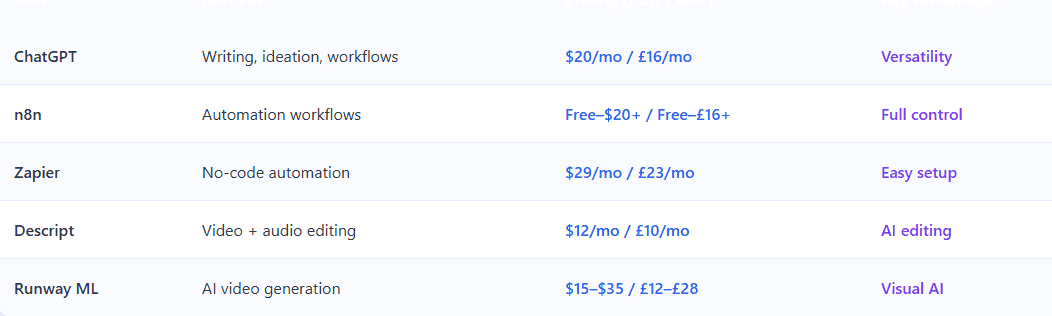
Zapier vs n8n for Creators: Which One to Choose?
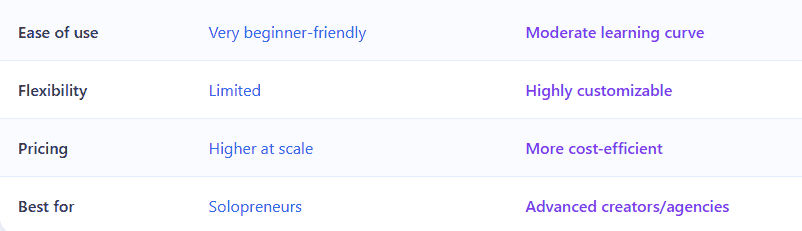
If you’re confused about choosing the right automation tool, check out Zapier vs n8n: Which Automation Tool Is Better for Freelancers for a clear comparison.
How to Grow Smarter (Not Just Faster)
Speed alone does not build authority. Strategy does.
Smart Growth Framework:
- Use AI to find topics
- Study how your audience behaves
- Try content types
If you want to grow your audience without losing your unique voice, read How to Use AI to Grow a Personal Brand Without Sounding Generic for practical strategies that balance automation with authenticity.
Example
A YouTuber from the UK got 180 percent engagement by
- Using AI to look at comments
- Finding questions that people kept asking
- Making content series for those questions
Content Repurposing: The Highest ROI Strategy
Making something once and sharing it everywhere is the way to grow in 2026.
If you want to maximize your content output without extra effort, read How Podcasters, Video Creators, and Newsletter Writers Can Use AI to Repurpose Content Efficiently to turn one piece of content into multiple formats.
Example Workflow:
- Record one podcast episode
- Turn it into
- 5 to 10 clips
- 3 social posts
- 1 blog article
- 1 newsletter
By using structured AI workflows for creators, you can turn ideas into multiple content formats efficiently. This reduces work by 60-70 percent. Gets more people to see it.
Protecting Quality in an AI-Driven World
Creators make a mistake here.
Risks of AI Overuse:
- Content that sounds the same
- Losing your voice
- Audience stops trusting you
To maintain trust and originality while using AI, check out How Creators Can Use AI Responsibly in 2026 Without Hurting Trust, Quality, or Audience Connection for a practical, ethical approach.
Quality Protection Framework
- Always add what you think or have experienced
- Use AI outputs as starting points, not content
- Keep your brand voice consistent
Real-World Creator Stack (Freelancer Example)
Let’s see how this works in real life.
Scenario: US-based freelance content creator
Stack:
Result
- Production time went from 12 hours to 5 hours
- Output went from 2 to 5 pieces per week
- Monthly revenue went from $2000 to $5500 (£1600 to £4300)
Pros and Cons of Using AI for Creators
Pros
- AI helps creators save a lot of time while working on projects. This is a plus because it means they can get things done faster.
- AI also helps creators make content without having to hire many people.
- AI gives creators the information they need to make decisions.
- Using AI helps creators be more consistent in their work.
Cons
- One downside of using artificial intelligence is that it can produce things that are not very good or that all sound the same.
- If creators rely too heavily on artificial intelligence, it can stifle their creativity.
- AI requires creators to set it up and learn how to use it at first.
Final Thoughts: The Creators Who Win in 2026
Many people think artificial intelligence will replace creators. That is not true. Artificial intelligence actually helps creators who work hard and are disciplined. It also shows when creators are not doing a job. The right tools make it easier to implement AI workflows for creators without adding complexity to your process.
To be successful in 2026, creators need to do things.
- They need to build systems that work well, rather than just following what is popular at the moment.
- They need to use artificial intelligence not just because they can.
- They need to make sure their own voice and style still come through, even when they are making a lot of content.
In the end, AI workflows for creators are not about replacing creativity but enhancing consistency and speed. If creators use artificial intelligence as a tool rather than taking the easy way out, they will be able to create faster and build a business that lasts and grows.
FAQ
-
How can creators use AI without losing originality?
By using AI for structure and drafts, then adding personal insights, tone, and experience to maintain authenticity.
-
What are the best AI tools for content creators in 2026?
Top tools include ChatGPT, n8n, Zapier, Descript, and Runway ML depending on your workflow needs.
-
Is AI content allowed for monetization (AdSense, clients)?
Yes, as long as the content is original, valuable, and not purely auto-generated without human input.
-
How much can AI increase content production speed?
Most creators report 2–4x faster production when using structured AI workflows.
-
Should beginners start with Zapier or n8n?
Beginners should start with Zapier for ease, then transition to n8n for scalability and cost efficiency.

Muhammad Hashir Khan is the founder and author of Pushtopeak and a BSCS graduate with over 3 years of experience in artificial intelligence, data science, and software development. His focus is on understanding how AI tools work in practical scenarios and how they can be applied to improve productivity and workflow efficiency. Through his writing, he shares structured insights to help freelancers and professionals use AI tools more intelligently and strategically.